
Canadian-owned drayage dispatch software

Stop leaving drayage money on the table.

Dispatch Board runs your container moves, your drivers’ phones and your billing in one place. It also tracks per diem, chassis bills and detention, so the charges you can bill or dispute don’t slip past.

15-day trial of a bigger plan. Unlimited dispatcher logins. Priced by the truck. Sign up yourself, no sales call needed.

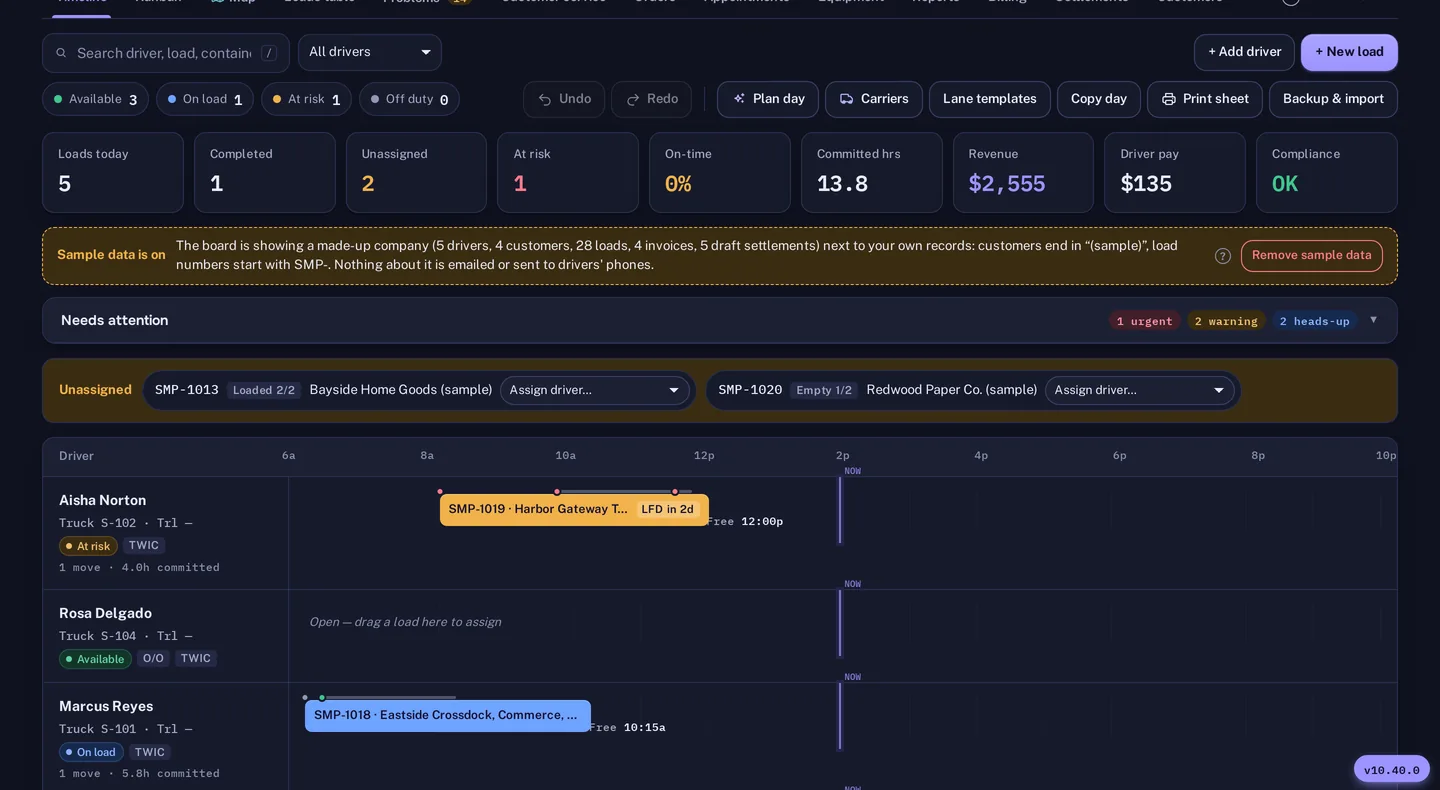
The Dispatch Board timeline in dark mode: driver lanes by hour, load chips, status counts and a day summary
Product screenshot with made-up sample data.
  • Built for drayageContainers, chassis, terminals and per diem are first-class, not custom fields.
  • Priced by the truckDispatcher and admin logins are unlimited. Driver, customer and carrier logins are free.
  • Canadian-owned, built in CanadaCanadian dollars first, GST/HST/QST/PST, kilometres, BC port pay checks. Port of Vancouver.
  • Try it yourselfSelf sign-up and a 15-day trial of a bigger plan.

Where drayage margin goes

Three charges that cut into your margin.

Per diem, chassis rental and detention are rarely wrong in your favour. Dispatch Board keeps the dates and the evidence, so you can bill the customer who caused a day or dispute the one the terminal caused.

A truck driver in a hard hat and hi-vis vest waiting in the cab in a line of trucks at a container terminal at dusk

Per diem

Every charged day gets a reason

For each day the line charges, the board shows what held the box: a closed terminal, a customs or freight hold, an appointment later than you asked for, or a customer who took delivery late. Add the customer’s share to the load in one click, or email the line a dispute letter with the dates and reasons.

Billing › Per diem

Rows of empty container chassis parked in a gravel yard at golden hour

Chassis

Check the pool’s bill against your own dates

Upload a DCLI, TRAC or Flexi-Van invoice. Each line is compared with when your loads actually had the chassis, so days billed after return, chassis you never had and doubled days stand out. Send the pool a dispute letter and a CSV of the lines.

Billing › Chassis bills

A long-nose truck hauling a container through a wet depot yard stacked with containers at dusk

Detention and missed charges

One figure for money left on the table

The Money Check totals unbilled detention, missed charges, per diem to bill or dispute and chassis charges to dispute. Tick one box and it lands in your inbox every Monday.

Billing › Money check

Feature tour

From the first email to the paid invoice.

One system for the dispatcher, the driver, the customer service desk and the person who does the books.

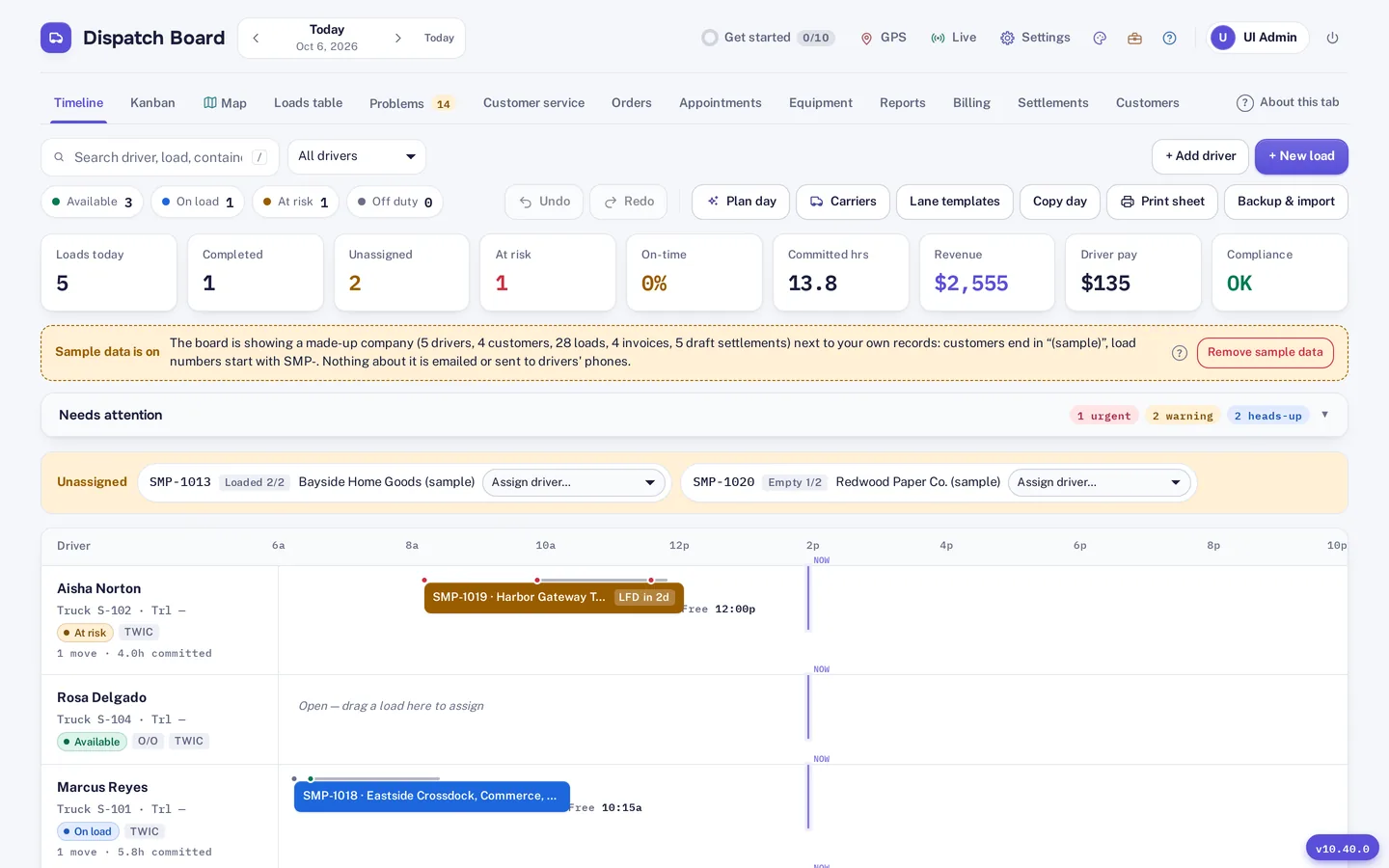
The timeline view in light mode with driver lanes, unassigned loads and live status counts
Timeline. Every driver’s day on one screen. Drag a load onto a lane to assign it.
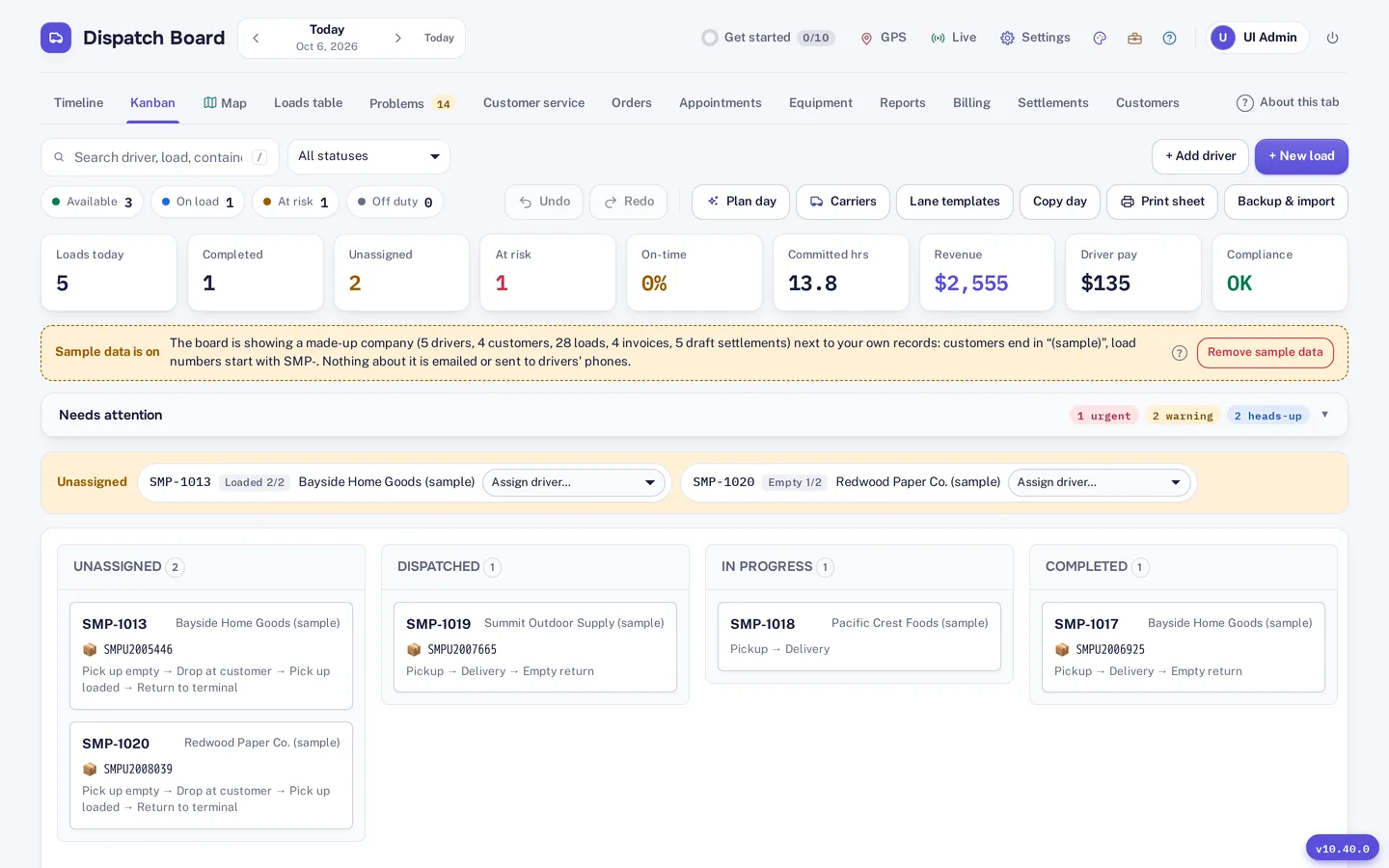
The Kanban view with loads in Unassigned, Dispatched, In progress and Completed columns
Kanban. The same loads as columns, from unassigned to completed.
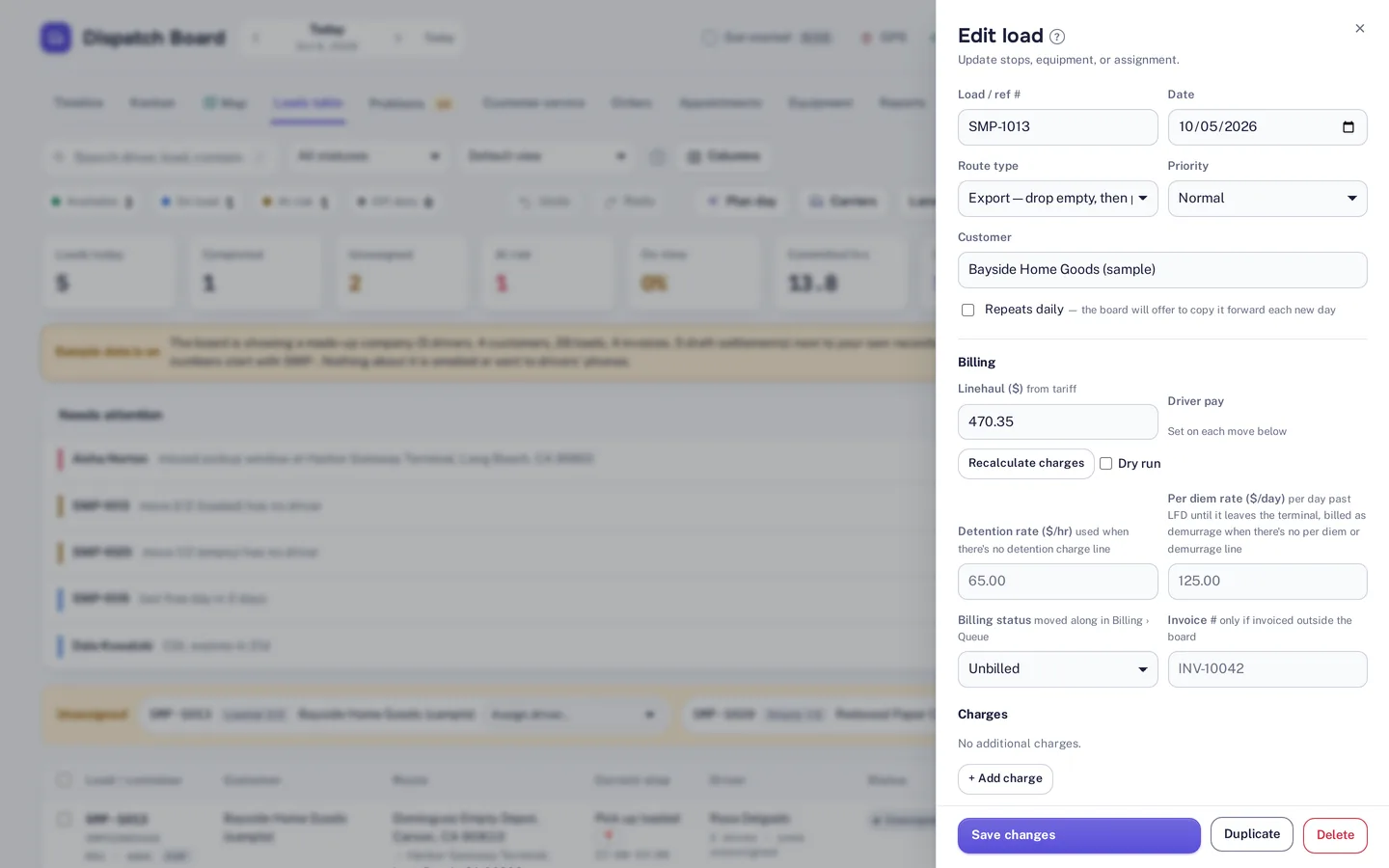
The edit-load panel with route type, linehaul, detention and per diem rates, billing status and charges
Load detail. Rates, detention, per diem and billing status sit on the load itself.
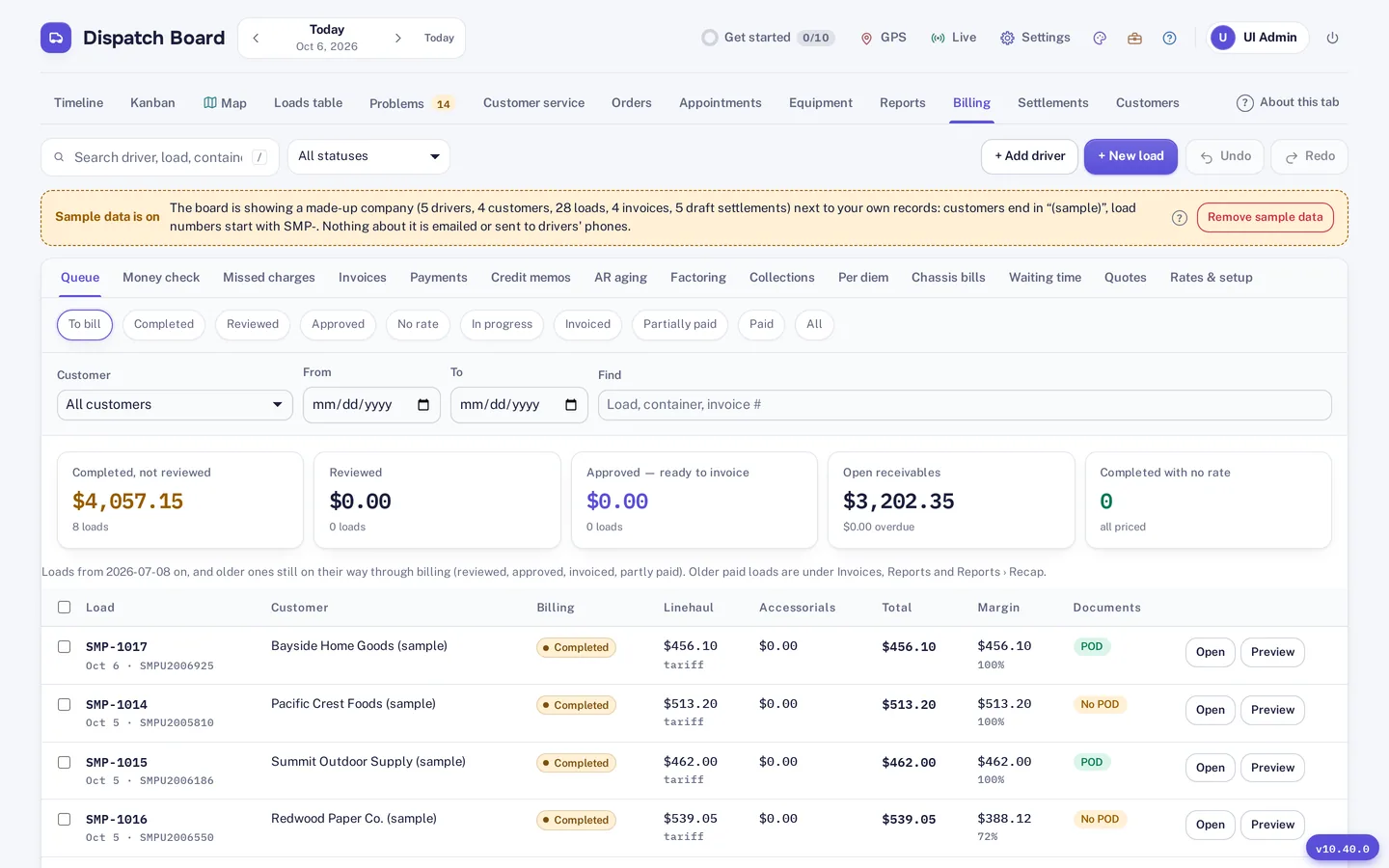
The billing queue with completed loads, linehaul, margin and proof-of-delivery status, and tabs for per diem and chassis bills
Billing. A queue of finished loads, with tabs for per diem, chassis bills and the Money Check.

All screenshots are the live product with a made-up sample company. No customer data.

A dispatcher at a desk with the dispatch board open on two screens

Dispatch

A board your dispatchers can run all day

See the day by driver on a timeline, as columns on a Kanban board, or on a live map. Drag a load onto a truck to assign it. Problems get their own tab: holds, last free days, late moves and missing information.

  • Plan day drafts the whole fleet’s day in one click and says why it picked each driver. Pin the picks you like and it plans around them.
  • It respects licences, endorsements, TWIC and driving hours, and leaves assigned moves alone.
  • Street turns and dual transactions are suggested, and an empty a terminal won’t take that day is not paired.
Aerial view of a container yard with stacks of containers and chassis

Containers and ports

Know when the box and the ship are ready

  • Container tracking through Terminal49 fills in availability and last free day.
  • Vessel arrival alerts from five AIS providers, two of them free to use.
  • Empty return restrictions by place, line and size. Affected loads show Return closed and where to send the empty instead.
  • A week grid for customer service: vessels, last free days, pickups, deliveries and returns for each of the next seven days.
  • A yard list with the per diem clock on every container sitting in your own yard.
An invoice and accounting figures on a desk next to a laptop

Billing and accounting

Invoices, pay and books without the re-keying

  • Rate profiles, accessorials, credit memos and a billing queue that lists what is ready to invoice.
  • Driver and owner-operator settlements with deductions, plus factoring entries.
  • QuickBooks Online and Xero sync, a Google Sheets sync and Stripe for card payments.
  • Credit limits per customer, aging and a collections view for what you are owed.

See every feature ›

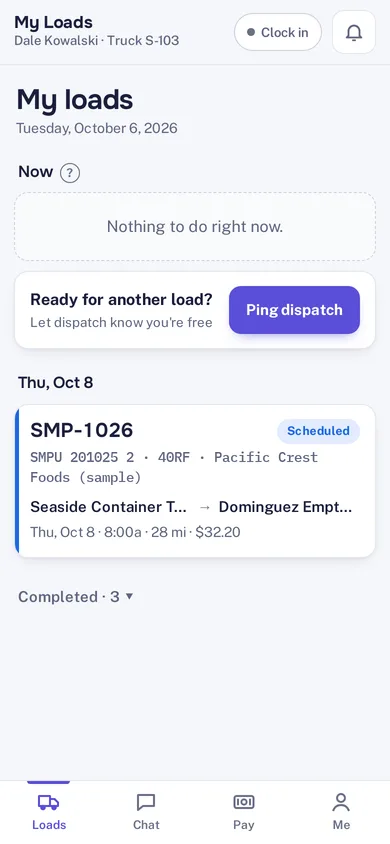
The driver app showing My Loads: clock in, a Ping dispatch button, a scheduled move and a bottom bar with Loads, Chat, Pay and Me
Driver app screenshot, sample data.

Driver app

An app that works where ports have no signal.

Drivers install it from the browser, with no app store. They accept moves, tell you they are on the way, and take document photos that wait for a signal and upload by themselves.

  • Alerts read aloud, so new work is heard without looking at the phone
  • Accept, decline or “on my way” on each move
  • Photos and PODs saved on the phone until they upload
  • Clock in and out, even offline
  • Chat with dispatch on each load
  • Pay statements as PDFs
  • “Ready for a load” ping from the yard
  • Opens Google Maps, Apple Maps or Waze

Spoken alerts play while the app is open on screen. A locked phone gets the normal notification sound, because phones don’t let a web app talk in the background.

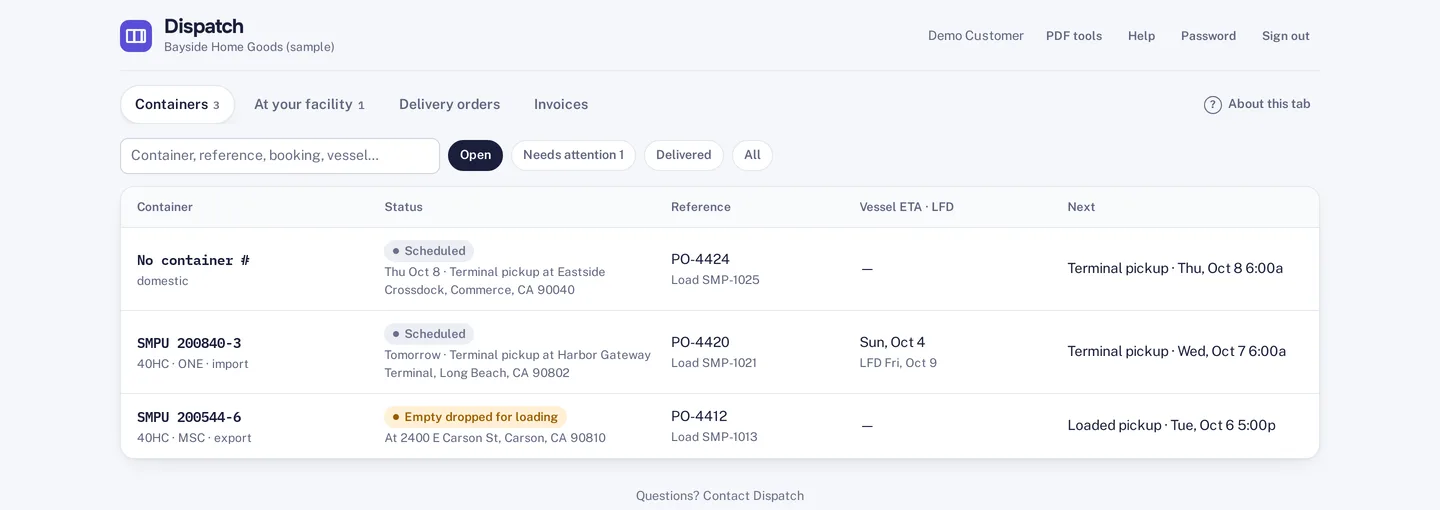
The customer portal listing a customer’s containers with status, reference, vessel ETA, last free day and the next step
Customer portal, sample customer. They see their own containers and nothing else.

Customer and carrier portals

Fewer “where is my container?” calls.

Your customers sign in to see their own loads, documents, projected charges and invoices, and they can upload delivery orders. Anyone with a tracking link sees live status without a login.

Brokering loads out? Carriers get their own portal for the moves you give them and the invoices they send back.

  • Customer logins are free and see only their own freight.
  • Status emails and WhatsApp messages to customers and drivers.
  • Your logo and company name on what customers see.
A dispatcher asking the assistant where a container is and getting an answer

Assistants

Clerical help that reads your own data.

DispatchBot answers plain questions such as “where is container MSCU1234567” or “what is the LFD for…” from the loads already on your board. The email tools read the repetitive paperwork and leave the final call with you.

  • Order intake reads emailed delivery orders into loads for review.
  • The email extractor pulls empty-return restrictions from line and terminal emails.
  • Document checks flag missing or mismatched paperwork.
  • The missed-charge finder looks for billable items before an invoice goes out.

Some assistants need an AI key or a plan that includes them. Details are on the pricing page.

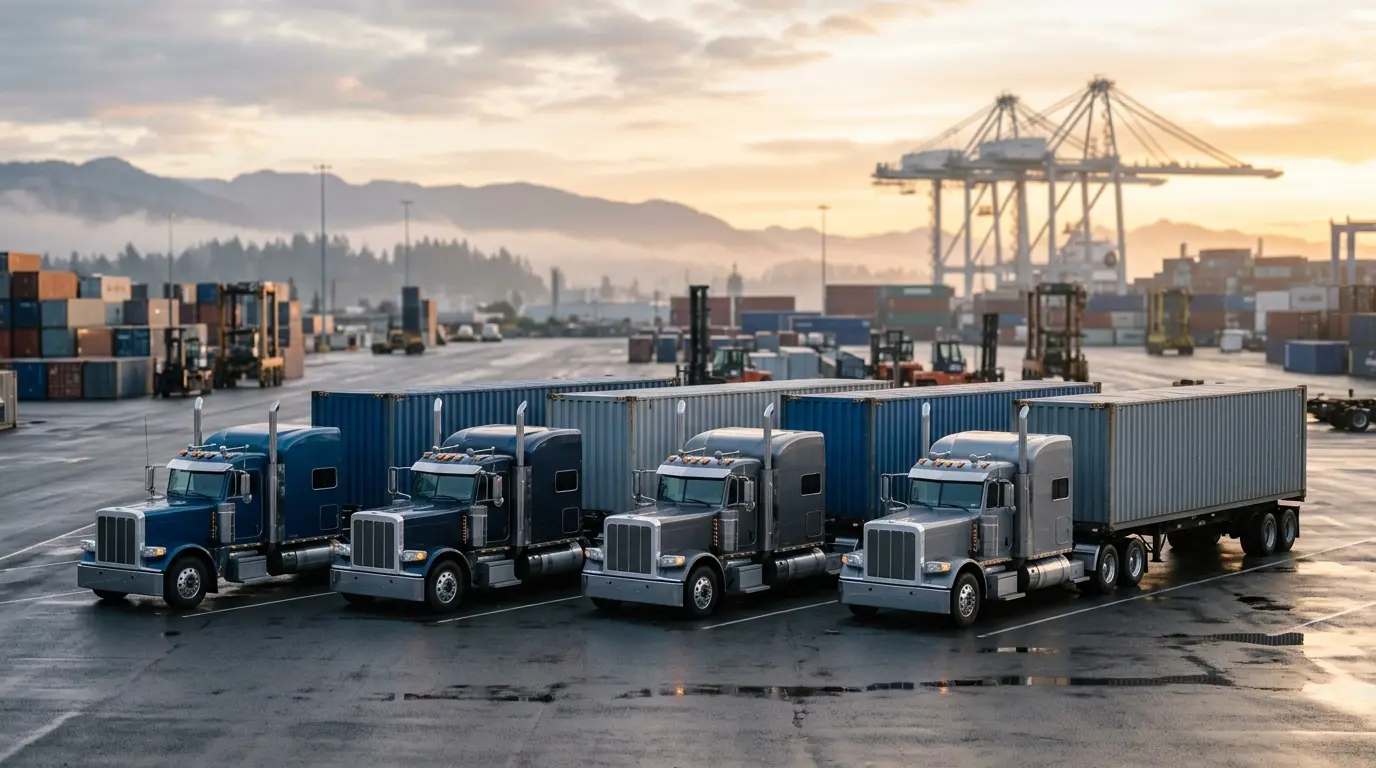
A row of long-nose container trucks parked side by side in a container yard at sunrise

Pricing

You pay for trucks, not for seats.

Every plan includes unlimited dispatcher and admin logins. Driver, customer and carrier logins are free. Add trucks one at a time as you grow.

What sets it apart

Built to recover money and keep drivers moving.

Four things that matter in drayage and are hard to find together.

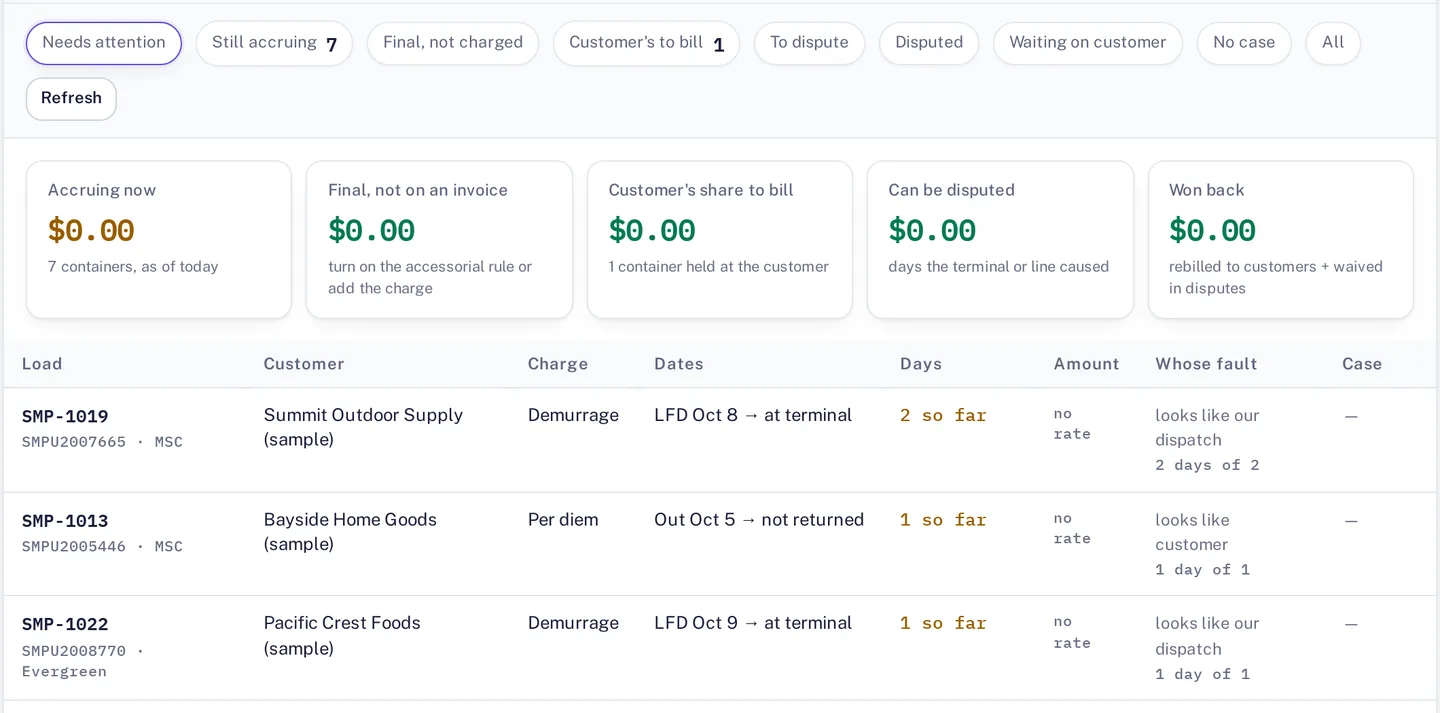
The Billing Per diem tab: totals for accruing and disputable days, and a list of containers with the charge, dates, days so far and whose fault each day looks like
Product screenshot with made-up sample data.

Per diem with a reason for every day

Each charged day gets a reason, such as terminal closure, hold or late customer delivery. Then you rebill the customer or send a dispute letter.

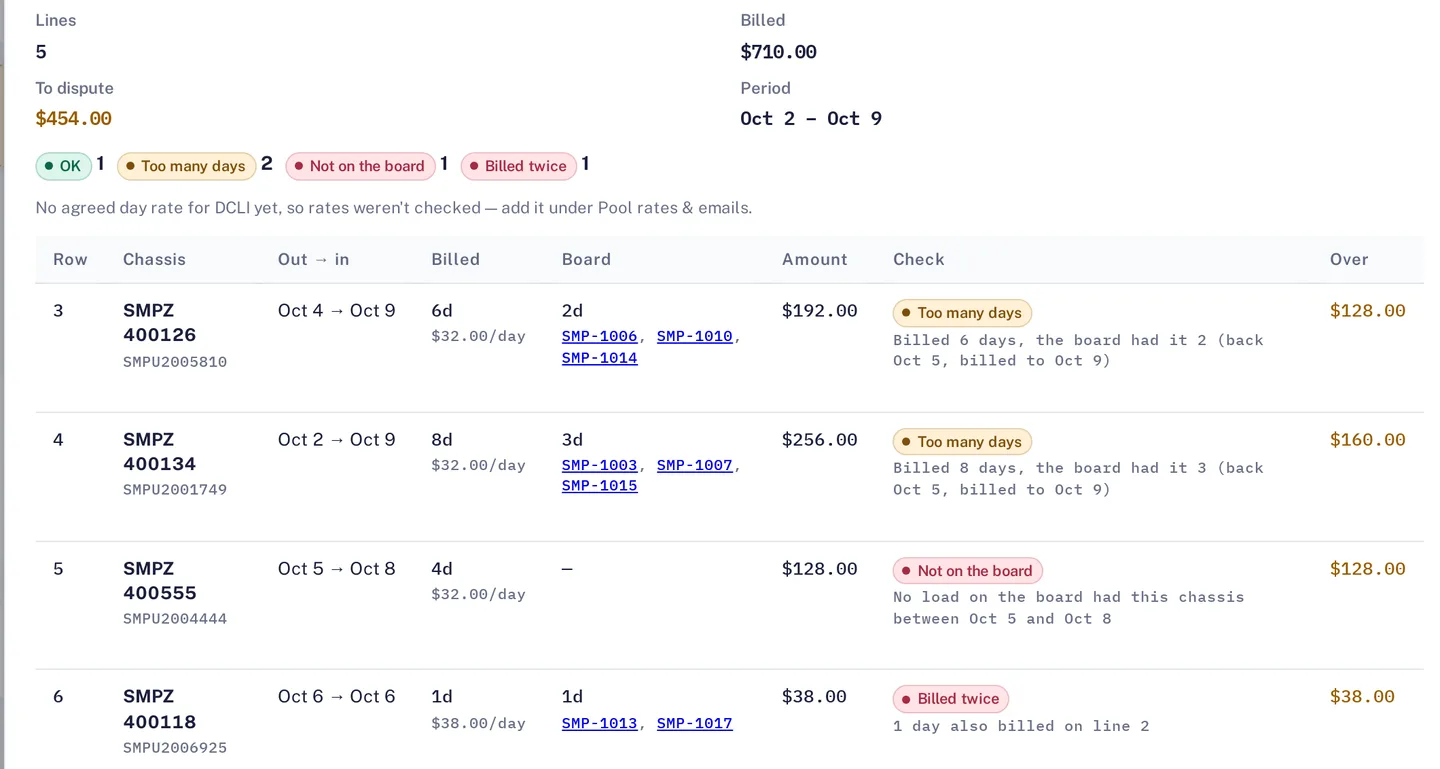
A DCLI chassis bill checked against the board: five lines, with lines marked too many days, not on the board and billed twice, and the amount to dispute for each
Product screenshot with made-up sample data.

Chassis bills checked against your dates

Upload a DCLI, TRAC or Flexi-Van invoice. Each line is compared with when your loads actually had the chassis, with a dispute letter and a CSV.

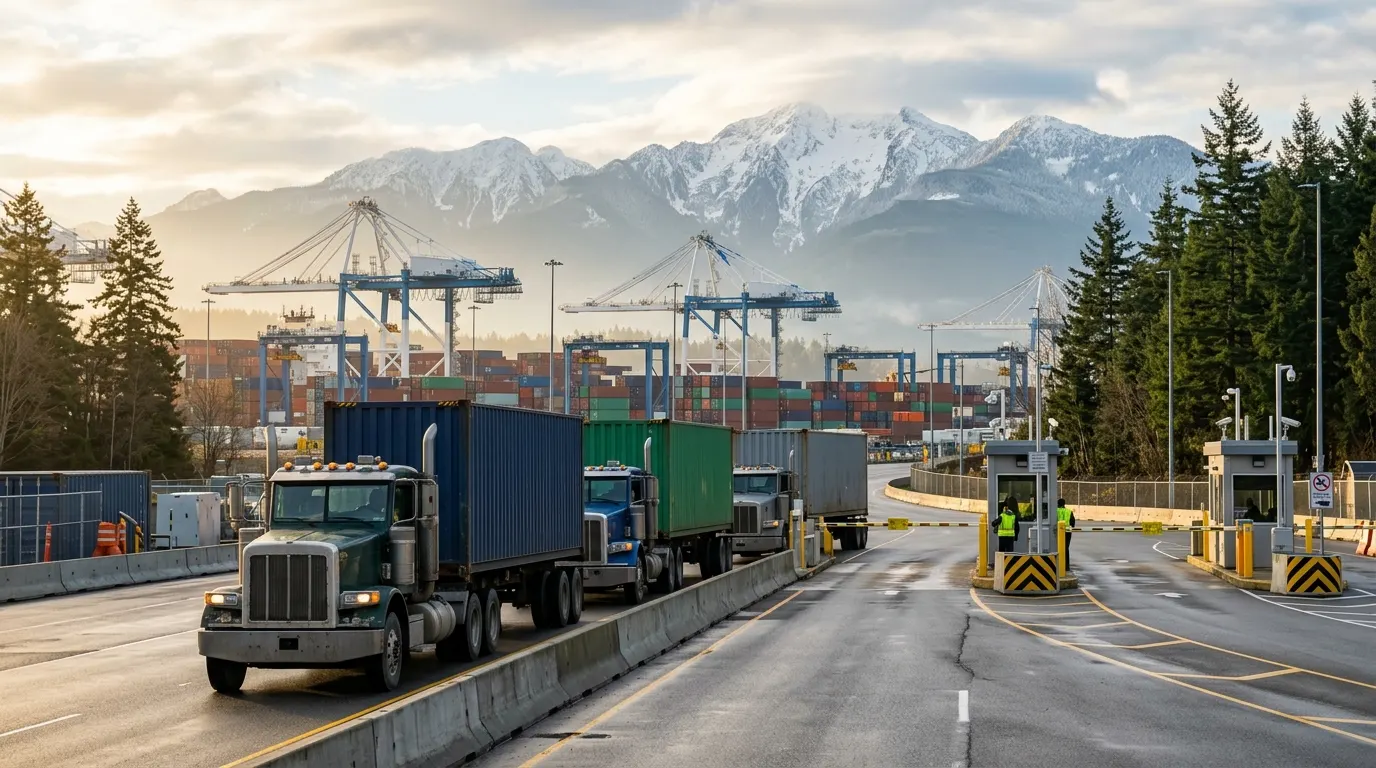
Three long-nose container trucks lined up at a terminal entry gate in the morning, with cranes and snow-capped mountains behind

BC Container Trucking Act pay check

An add-on checks pay against the Act each pay period, for carriers working in BC ports.

A driver in a hi-vis vest photographing a container door with a smartphone, a long-nose truck behind

A driver app with no app store

It opens in the phone’s browser. Photos and PODs wait on the phone until there is a signal, then upload by themselves.

See all features ›

Questions

Before you ask.

Already using another system?

You don’t have to switch to find out. The trial doesn’t touch your current system, so enter a week of real loads in both and compare which per diem, chassis and detention charges each one catches. If you depend on something we lack, such as automatic terminal booking or EDI, see the feature list first.

Is a small fleet too small for this?

Pricing is per truck, and dispatcher and admin logins are unlimited, so a five-truck company doesn’t pay for seats it doesn’t use. Drivers, customers and carriers log in free. Plans start at $149 a month with five trucks included, see the pricing page.

Will my drivers actually use it?

The driver app opens from a link and sits on the home screen, with no app store. Each move has one tap for accept, decline or on my way, and photos wait on the phone until there is a signal.

Do I need to install anything?

No. Dispatchers use the board in a browser. Drivers open the driver app in their phone’s browser and can add it to the home screen.

Can I move my existing data over?

Yes. You can import drivers, trucks, chassis, customers, rates and loads from Excel, CSV or a PDF rate sheet. Each row is checked before anything is saved, and duplicates are flagged.

Does it work for Canadian carriers?

Yes, Canada comes first. Dispatch Board is Canadian-owned and built in Canada by Virtuoso Technologies Ltd. It handles Canadian dollars (and USD for cross-border work), GST, HST, QST and PST, and kilometres or miles. An add-on checks pay against the BC Container Trucking Act each pay period. Hauling at the port? See Dispatch Board for Port of Vancouver carriers.

Does it book terminal appointments for me?

Not automatically. You can set appointment rules and slot capacity and use booking links. Automatic booking through terminal systems is not something we offer.

What happens to my data if I leave?

You can download a full backup file and a CSV of your loads at any time. Plans are month to month, so you can cancel any time.

See your own loads on the board.

Start a trial, import your drivers and a week of loads, and judge it on your own freight.